


PlanPal™ Smart Family Calendar
PlanPal™ Smart Family Calendar
🗓 Everyone's plans, one screen, always synced
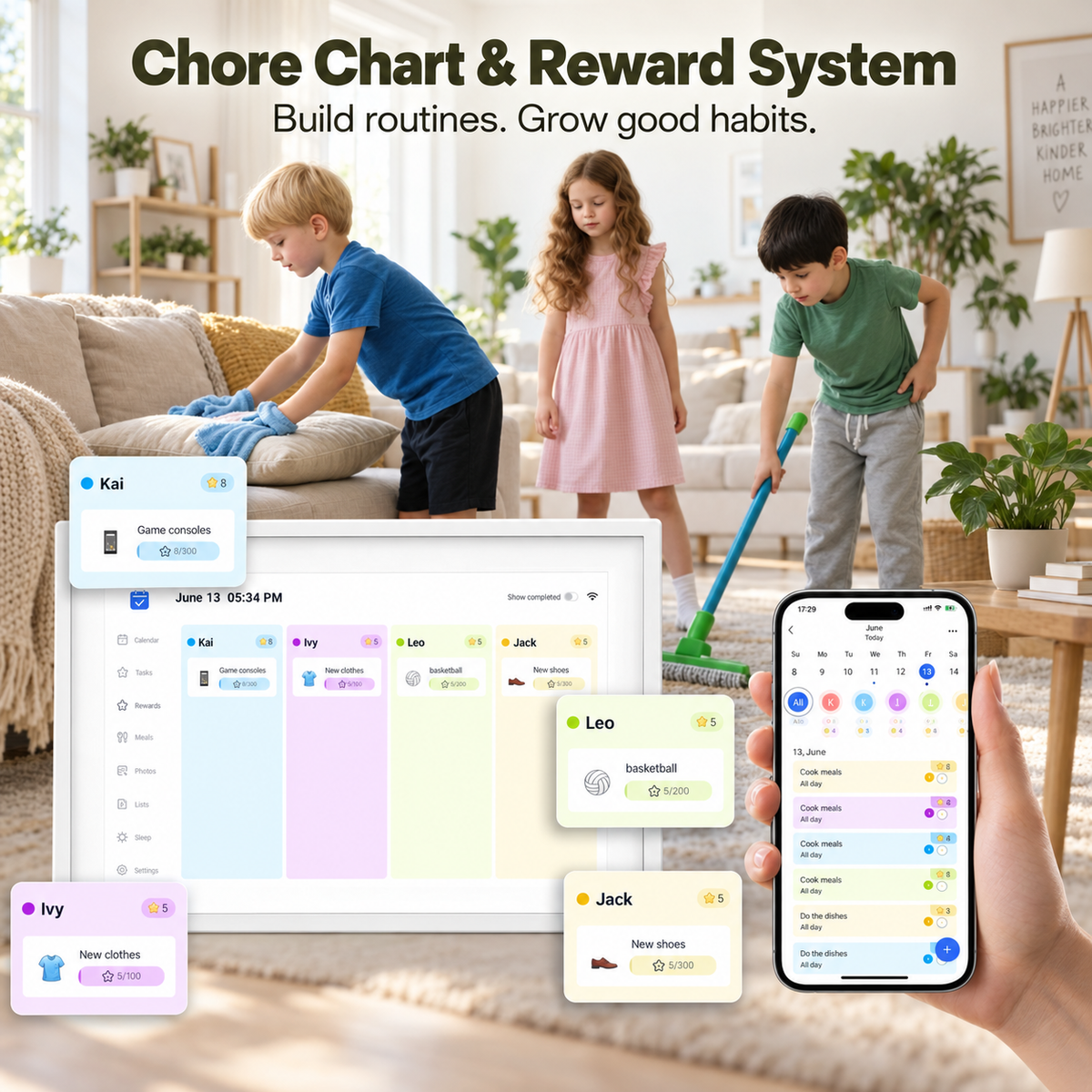
⭐ Chores kids actually want to do
🍝 Dinner, decided before Monday
📱 Update it from anywhere
Couldn't load pickup availability
PlanPal™ Smart Family Calendar
🎁 Free Wall Mount Kit ($39 value) — this month only.
⏱️ 10-min setup · 🚚 Ships in 1–2 days · ↩️ 30-night returns · 📦 Free shipping, always


You are not the family calendar.
The dentist. Practice at 4pm. The birthday present due Wednesday. What's for dinner.
You carry all of it — not because you can't let it go, but because there's nowhere else for it to live.
PlanPal gives it somewhere to live.

Before PlanPal. After PlanPal.
-
11pm, still making lists
→ Lights off. It's on PlanPal.
-
"Why didn't anyone tell me?"
→ It was on the wall.
-
Asking twice. Three times.
→ They're chasing stars instead.
-
You, the family's memory
→ You, a person again.
No subscription. Not now, not ever.
On most family calendars, these sit behind a monthly plan. On PlanPal, they're just included.
| PlanPal | Subscription calendars | |
|---|---|---|
Chore chart & star rewards |
||
Meal planning & recipes |
||
Photo frame mode |
||
Family sharing across devices |
||
Free software updates, forever |
Find your size.
Compact for smaller spaces. Classic for most families. Grand for big families and big walls.


Worried it'll end up an expensive clock?
Fair. Live with it for 30 nights. If nobody's checking the wall, send it back.
No awkward conversations. No hoops.
Good to know
Is there a subscription?
Is there a subscription?
No. Every feature is included from the day you plug it in. Nothing to upgrade to, nothing to renew.
Will it work with the calendars we already use?
Will it work with the calendars we already use?
Yes. It syncs with Google, Apple (iCloud), Outlook, Yahoo and Cozi. Nobody has to switch apps or retype anything.
I'm not techy. Is setup hard?
I'm not techy. Is setup hard?
If you can connect your phone to Wi-Fi, you can set up PlanPal. Plug it in, connect, sync your calendars. About 10 minutes, and a real person is here if you get stuck.
Is there a mobile app?
Is there a mobile app?
Yes — a free companion app for iOS and Android, included with every PlanPal.
Manage everything on the wall from your pocket: add or edit events, tick off chores, update lists, and upload new photos for photo frame mode. Keep multiple PlanPals in sync across different rooms, or even two homes.
You don't need to be standing in front of the screen to change what's on it.
What else can it do?
What else can it do?
Weather for the day, right next to your schedule.
Event countdowns for birthdays and big days.
Day, week, month and agenda views — switch however you like.
Sleep mode — dims at night, wakes gently each morning.
Free software updates — new features arrive on your existing PlanPal, no new purchase needed.
Which size should I choose?
Which size should I choose?
Compact 10.1" suits smaller families and smaller spaces.
Classic 15.6" is the one most families choose.
Grand 21.5" is for big families and big walls.
Stuck between two? Go bigger. Nobody has ever wished they could see the week less.
What's in the box and the specs
What's in the box and the specs
In the box: your PlanPal, desktop stand, power adapter and quick-start guide. Want it on the wall? Add the Wall Mount Kit separately.
Screen: touchscreen LED, 1280 × 800 (10.1") or Full HD 1920 × 1080 (15.6" and 21.5")
Connectivity: Wi-Fi
Memory: 2GB RAM, 32GB storage (expandable via USB/SD/MMC)
Colors: Black or White
Warranty: 12 months
Shipping and the 30-night trial
Shipping and the 30-night trial
Orders ship within 1–2 business days, with tracking. Shipping is always free.
You have 30 nights from delivery to try PlanPal at home. If it's not right for your family, send it back for a refund. Return shipping is at your cost.
